03 / Analyze · Advanced Gaze Dynamics
Scanpaths, sequences
and strategy clusters.
Compare scanpaths and similarity matrices, search AOI sequences and discover automatic strategy clusters. Inspect transitions, recurrence and matching conditions with the recording and method in view.
Follow order and time
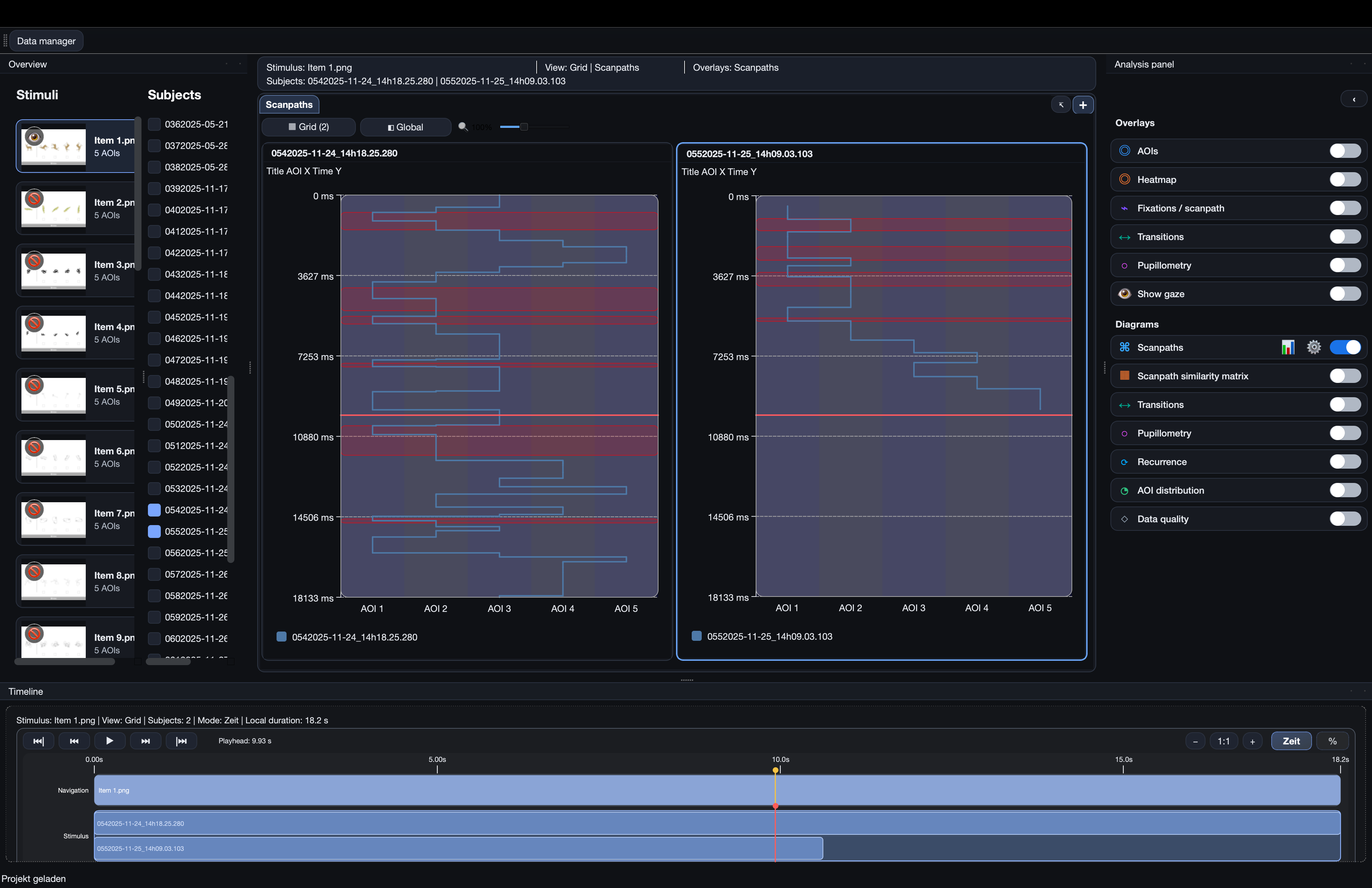
Scanpaths & parallel comparisons
See the path through AOIs and compare recordings alongside one another. Keep the visual order and its time basis visible.
- Compare paths. Display participants or items in parallel views, with time and AOI axes in the selected orientation.
- Align the comparison. Use a shared maximum time axis based on the grid, the project or a chosen duration. Keep outside-AOI handling explicit.
- Follow playback. Reveal the path up to the playhead, display the live AOI-letter sequence and retain named analysis-window context.
Compare participants or items
Scanpath similarity matrices
A matrix makes pairwise similarities and differences visible across the selected recordings. Choose the comparison basis that matches the question.
- Choose the axis. Compare participants or items and keep the selected scanpath source and aggregation visible.
- Choose the method. Use Levenshtein-based AOI-sequence comparisons and the available ScanMatch-style or MultiMatch-style representations for timing or path structure.
- Keep definitions attached. AOI-only, outside-inclusive, compact and time-weighted representations answer different questions. Iriscope’s adapted ScanMatch/MultiMatch procedures must be reported using their actual definitions.
Find occurrences in the paths
AOI sequence search
Search for a defined order of regions, such as AOI 1 → AOI 3 → AOI 5, and locate the matching portions of the scanpaths.
- Build one or several queries. Select AOIs by clicking their chips, add multiple sequences and give them distinct highlight colours.
- Set the match rule. Search a direct consecutive sequence or allow intermediate AOIs while retaining the requested order.
- Review the hits. Highlight matching portions in the diagram or show only matching paths. The query and selected sequence source remain part of the comparison.
Discover similar gaze patterns
Automatic strategy clusters
Group complete scanpaths using their selected distance basis. Inspect the patterns and their members rather than treating every recording as an isolated path.
- Choose what makes paths similar. Use AOI order, transition profiles, dwell-time profiles, spatial fixation paths, fixation/saccade profiles or a weighted combination.
- Choose or recommend the grouping. Hierarchical clustering and k-medoids are available. Set the cluster count or use an automatic recommendation informed by silhouette and stability.
- Inspect the result. Review members, representative observed scanpaths (medoids), cluster comparisons, hierarchy and quality diagnostics. The automatic cluster count is an exploratory recommendation tied to the selected data and method.
Inspect movement between regions
Transitions & entropy
Describe where gaze goes next and how the AOI sequence is structured. Combine transition views with the corresponding numerical results.
- Inspect the connections. Use transition matrices and network representations to review movement between meaningful regions.
- Inspect the sequence measures. Review incoming and outgoing transitions, transition counts and entropy with their source visible.
- Retain the sequence convention. Sample-based and fixation-based sequences, outside states and time windows can produce different results.
Find repeated and shared temporal structure
Recurrence & cross-recurrence
Inspect repeated gaze states within one sequence or common structure between two sequences through recurrence-based analyses.
- Inspect the view. Review recurrence matrices, network representations and directional lag profiles where available.
- Inspect the measures. Use recurrence rate, determinism, laminarity, trapping time and the corresponding cross-recurrence results.
- Retain the basis. Keep the sequence definition, time basis, outside-state treatment and relevant settings with the selected comparison.
Combine thresholds and sequences
Condition & value search
Find cases or timed occurrences that meet explicit rules across stored metrics, temporal signals and AOI sequences.
- Build the rule. Select a field, operator, value and source. Combine conditions using AND, OR and NOT.
- Inspect matching cases. Review the hit table and return to the corresponding recording instead of losing the data context.
- Continue the analysis. Save timed occurrences as named analysis windows. Stored search hit counts and result identifiers can accompany the relevant exports.
Keep the result connected.
Connect the workflow
Bring this capability into your study.
Tell us about the material, recording and result you need to inspect. We can identify the appropriate product and method scope.